Mass Transportation Benefit Program (MTBP)
Allocate Your MTBP Benefits
If your transportation provider is not equipped with a “tap and go” SmarTrip® farebox, or if you use a mobile ticketing app, you must set up an “Allocation.”
Allocation is the process of electronically transferring your transit funds from your SmarTrip® account to your specific 3rd-party vendor (e.g., VRE, MARC, Vanpools, OmniRide Express).
Failure to complete the allocation step will cause claimed benefits to be sent directly to your SmarTrip® card for Metro rail/bus use only. This step must be completed by the stated deadlines in the month prior to benefit delivery.
Before You Allocate: Critical Rules
- You Must Claim First: You can only allocate funds if you are fully enrolled and have submitted a monthly claim. (No Claim = No Benefits to allocate).
- Benefit Changes: If your commuting costs change, you must manage the benefit level in BOTH the DoW MTBP account AND the 3rd party vendor allocation. They do not sync automatically. Neither the DoW MTBP application nor claims update modify a participant’s allocation account.
- Card Replacements: If you link a new SmarTrip® card to your MTBP account (or transfer a physical card to a digital mobile wallet), you must update your allocation account with your new card number. Changing to another SmarTrip® card without updating your provider can break an allocation, effectively stopping payment to that service!
Strict Monthly Deadlines
You cannot move funds within the current month. Allocations for the next month’s benefit delivery must be completed by the following deadlines:
- The 15th: Deadline for tickets purchased through CommuterDirect.com (Mailed/Pickup passes).
- The 21st: Deadline for all other providers (WMATA Allocation, Vanpools, Mobile Apps). Note: Allocations cannot be edited on SmarTrip.com between the 22nd and the end of the month.
General WMATA Allocation Instructions
For 3rd Party transportation providers, you will use the WMATA SmartBenefits® portal to route your funds. You can watch a detailed video showing the allocation process posted by WMATA or follow the steps below:
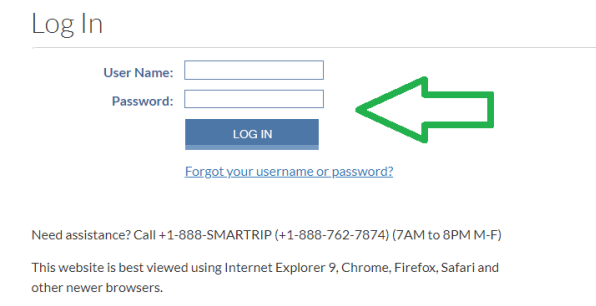
- Go to the SmarTrip® website and log in:
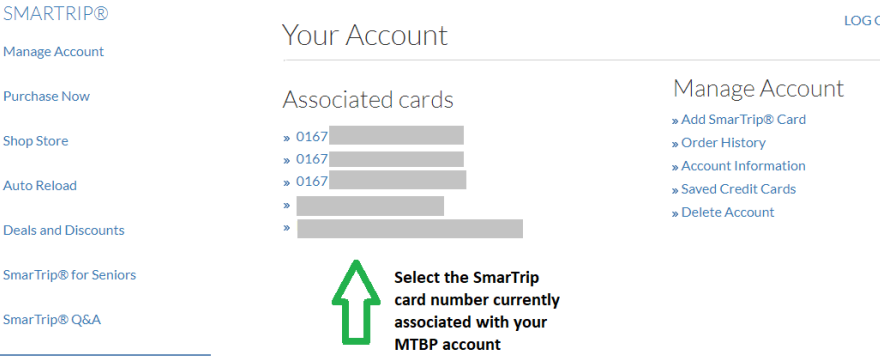
- Click the SmarTrip® card number your SmartBenefits® are going to:
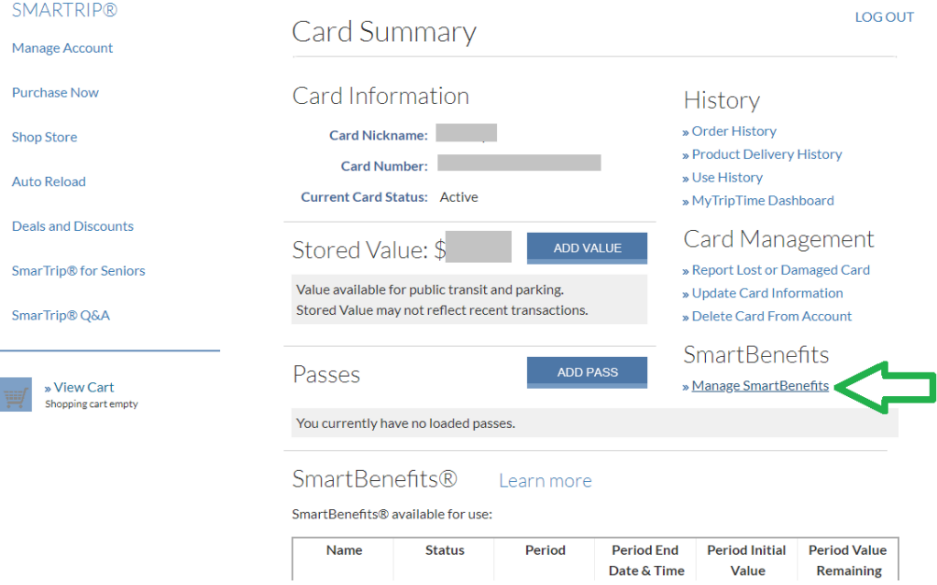
- On the right-hand side, click ‘Manage SmartBenefits’:
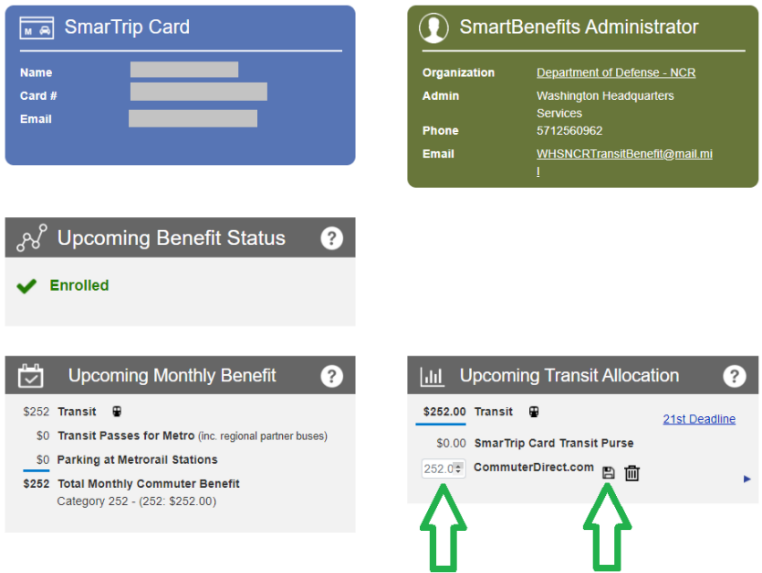
- On the new page, under the ‘Upcoming Transit Allocation’ section, click the icon to update the allocation amount:
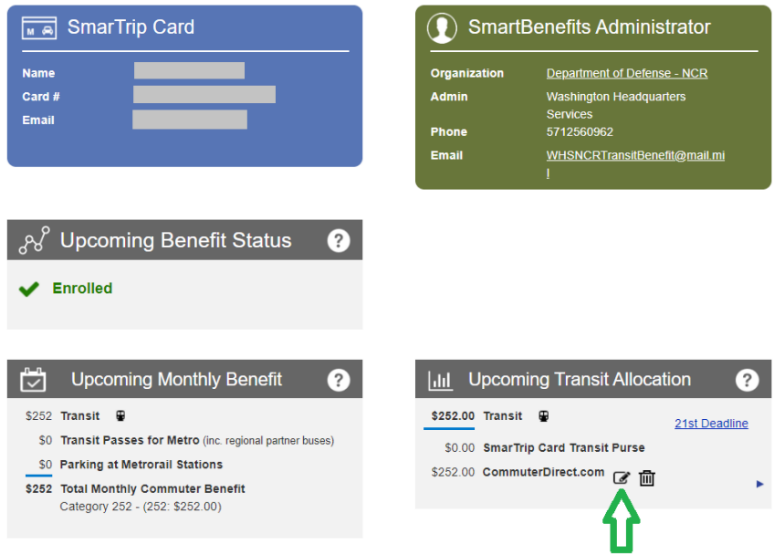
- Click the ‘Save’ icon:
VRE, MARC, & MTA Commuter Buses (Dillon’s, Keller, Eyre)
Riders of these three rail and bus systems have two options to receive their passes:
Option 1: Mobile Ticketing Apps (Deadline: 21st)
- Allocate your SmartBenefits® funding to the mobile app through your WMATA SmarTrip® account.
- Download your provider’s app: MTA Mobile (for MARC/MTA Buses) or VRE Mobile (for VRE).
- Set up the app using your SmarTrip® card number, select your fare, and checkout using “SmartBenefits” as your payment type.
Option 2: CommuterDirect.com Mail/Pickup (Deadline: 15th)
- Create a CommuterDirect account.
- Allocate your funds to CommuterDirect through your WMATA SmarTrip® account.
- Purchase your desired product on CommuterDirect. Your pass will be mailed to you between the 10th and 22nd or held for pickup at a Commuter Store.
Riders of Vanpools
- Create a WMATA SmartBenefits® Passenger Allocation account to move your benefit to your Vanpool provider.
- Ask your Vanpool operator for their specific ID information to identify your Vanpool in the allocation system.
- Benefits will be delivered directly to your Vanpool’s account on the first of the month. (Deadline: 21st)
PRTC OmniRide (Express Pass vs. Daily Fare)
- $285 Monthly Express Pass (13+ Days/Month): If you commute 13 days (26 round trips) or more, select the $285 pass to save taxpayer funds. Allocate your benefits to OmniRide through WMATA by the 21st. Download the OmniPay App, set it up, and show the activated pass to the driver.
- Daily Board & Swipe (Under 13 Days/Month): If you commute less frequently, select the Daily $11 one-way fare on your MTBP application. Do not allocate. Simply tap your SmarTrip® on the bus farebox to pay your fare.
RideSmart Commuter Bus
- Allocate your SmartBenefits® benefit to DC MOTORCOACH (DC008) through your WMATA SmarTrip® account by the 21st.
- When you board the bus, inform the driver you are using SmartBenefits® and provide your name for verification. Tickets expire after 1 month. (Contact: becky@ridesmartva.org | 540-635-4146)
MetroAccess Paratransit
- Allocate your benefits from your SmarTrip® account to your MetroAccess account by the 21st.
- Manage your SmartBenefits® using the MetroAccess EZ-Pay system. (Note: Funds must be available in EZ-Pay prior to booking a trip).
Amtrak
- Allocate your benefits to CommuterDirect.com from your WMATA SmarTrip® account.
- Call CommuterDirect at 703-228-7433 and ask for assistance to establish a “VOUCHER” order and mailing for Amtrak.
- Take your mailed vouchers to Union Station to exchange them for tickets. (Note: Amtrak will not sell one-way tickets; minimum purchase is a 10-ride ticket. Your MTBP application and allocation must reflect this 10-ride price).